Your sprinklers ran through a rainstorm again — or your system hasn’t come back on in days. Either way, the culprit is almost always the same: a dead or miscommunicating Hunter Wireless Rain-Clik transmitter. The good news? Replacing it takes about 10 minutes and costs $68.45. This guide walks you through everything — how to diagnose, when to replace vs. repair, and exactly how to swap in the new WR-CLIK-TR transmitter and pair it to your receiver.
What Is the Hunter WR-CLIK-TR?
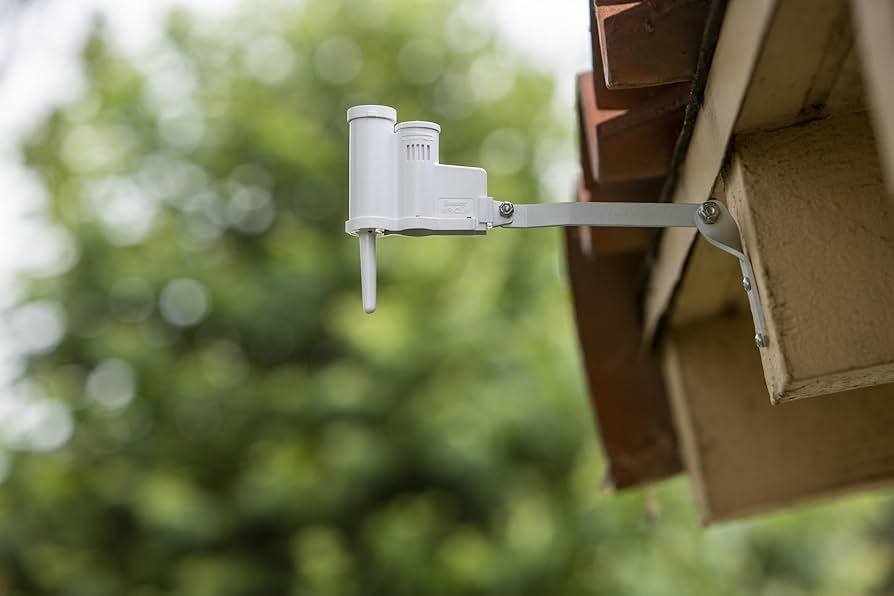
The Hunter WR-CLIK-TR is the replacement transmitter for the Hunter WR-CLIK Wireless Rain/Freeze Combo Sensor system. The transmitter is the outdoor unit — the white sensor you see mounted on your house, fence, or gutter — that detects rain and freezing temperatures and wirelessly signals your irrigation controller to shut off.
Here’s how the full WR-CLIK system breaks down:
| Part | What It Does | Part Number |
|---|---|---|
| Transmitter (outdoor) | Detects rain & freeze, sends wireless signal | WR-CLIK-TR |
| Receiver (indoor, at controller) | Receives signal, tells controller to pause | WR-CLIK-R |
| Full Kit | Both units pre-paired from factory | WR-CLIK |
| Cap & Spindle Assembly | Swappable absorber discs only | 505900SP |
When people say “my rain sensor stopped working,” they almost always mean the transmitter has failed — the outdoor unit that takes the weather punishment year after year.
5 Signs Your WR-CLIK Transmitter Needs Replacing
Before you buy a new transmitter, confirm it’s actually the problem. Here are the dead giveaways:
- Sprinklers ran during or after rain — The system should have shut off the moment rain hit the sensor. If it didn’t, the transmitter isn’t sending a signal.
- The “Sensor Bypass” LED on the receiver is flashing red — This is the receiver’s way of saying it has lost communication with the transmitter. The most common cause is a dead transmitter battery.
- LED test fails on the transmitter — Press and hold the quick-response spindle on top of the outdoor unit. Within a few seconds, the LED on the bottom of the transmitter should flash briefly. If nothing happens, the battery is dead and the unit must be replaced. The battery is permanently sealed — it’s not replaceable.
- System is stuck “off” even in dry weather — If your controller says the sensor is active but there’s been no rain, the transmitter may be stuck wet, or communication is lost entirely.
- The transmitter has a wire antenna (4″–5″ hanging wire) — This is an older generation unit that uses a different frequency. If you see a thin wire hanging from the bottom of the sensor, you need a full kit replacement (WR-CLIK), not just the transmitter — Hunter changed the frequency on newer models.
WR-CLIK-TR vs. Full WR-CLIK Kit: Which Do You Need?
This is the #1 question people get wrong before ordering. Here’s the rule:
| Your Situation | What to Buy |
|---|---|
| Your transmitter has a solid plastic antenna (no hanging wire) | ✅ WR-CLIK-TR transmitter only — your receiver stays |
| Your transmitter has a wire antenna (4″–5″ long wire) | ❌ Must buy full WR-CLIK kit — both units need replacing |
| Your receiver is dead but transmitter works | WR-CLIK-R receiver only |
| Both units are 5+ years old | Full WR-CLIK kit for peace of mind |
The solid antenna = newer frequency. Wire antenna = older frequency. They are not cross-compatible. Hunter changed the frequency years ago and a new WR-CLIK-TR transmitter will not pair with an old wire-antenna receiver.
How to Replace the Hunter WR-CLIK-TR Transmitter (Step-by-Step)
Total time: ~10 minutes. No special tools required.
What You’ll Need
- New Hunter WR-CLIK-TR transmitter
- Access to your irrigation controller (indoors)
- Mounting screws (included with transmitter)
- A phone or tablet with the Hunter Hydrawise or Luxor app (optional, for confirmation)
Step 1 — Remove the Old Transmitter
Unscrew or unclip the existing WR-CLIK transmitter from its mounting bracket on your house, fence post, or gutter. Set it aside — you won’t need it again. The receiver inside stays connected to your controller. Do not disturb the receiver wiring.
Step 2 — Mount the New Transmitter
Mount the new WR-CLIK-TR in the same location, or choose a better spot. Hunter’s placement guidelines:
- Maximum range: 800 ft (275 m) from the controller receiver
- No metal obstructions between transmitter and receiver (walls, AC units, electrical panels reduce range)
- Mount on a building side or post — not under a deep eave that blocks rainfall
- Keep clear of sprinkler spray — should only get wet from actual rain
- Avoid mounting near other radio devices (wireless speakers, routers, etc.)
Step 3 — Adjust the Vent Ring
The vent ring on the top of the transmitter controls how quickly the sensor resets after rain (how long your irrigation stays off after the rain stops):
- Open vents → faster reset (system comes back on sooner after rain)
- Closed vents → slower reset (system stays off longer — good for heavy rain areas)
Hunter’s Quick Response® feature will shut the system off almost immediately when rain starts (2–5 minutes), regardless of vent position. The vent ring only controls the post-rain reset time.
Step 4 — Pair the New Transmitter to Your Existing Receiver
Every WR-CLIK transmitter has a unique address. After installing a replacement, you must pair it to the receiver — it won’t just work automatically. This is the step most people skip and then wonder why their system still isn’t responding.
Pairing Instructions (from Hunter Industries):
- Remove AC power from the controller. Turn the dial to OFF or unplug it — don’t just press the bypass button.
- Press and hold the BYPASS button on the receiver (the small box wired into your controller).
- While holding the bypass button, restore power to the controller. The sensor status LED on the receiver will turn AMBER/YELLOW — this means it’s in pairing mode, ready to learn a new address.
- Go to the new outdoor transmitter. Press and hold the Quick Response button (the spindle on top) for at least 5 seconds.
- Watch the receiver LED. Within 4 seconds it should turn RED — confirming it learned the new address. This address is saved even through power outages.
- Release the spindle button. The LED will turn GREEN — pairing complete, sensor is active and dry.
⚠️ Important: When power is first restored, the receiver LED will appear red while it auto-syncs. This can take up to 1 hour. For an immediate sync: press and hold the Test button on the receiver for 5 seconds, then release. The LED will turn green.
Step 5 — Test It
With the sensor dry and the green LED confirmed, test the whole loop:
- Set your controller to Manual All Stations mode — the system should start running zones normally (sensor is dry = green = irrigation allowed).
- Press and hold the quick-response spindle on the transmitter to simulate rain. Within 2–5 minutes, your controller should pause irrigation. The receiver LED will go red.
- Release the spindle. After a few minutes (or per your vent ring setting), irrigation should resume and the LED goes back to green.
If it shuts off and comes back on — you’re done. The new transmitter is working perfectly.
Watch: Hunter Rain Sensor FAQ Video
This official Hunter Industries video covers how rain sensors work, how to troubleshoot them, and how to test your sensor — worth watching before and after your replacement:
Troubleshooting After Replacement
LED is still red after pairing — system won’t turn on
Don’t panic — the receiver LED can stay red for up to 1 hour after power is restored while it syncs. Press and hold the Test button for 5 seconds to force an immediate sync. If it still doesn’t go green, repeat the pairing steps — make sure you held the spindle for a full 5 seconds in step 4.
System still runs through rain after replacement
Check that your controller’s sensor setting is set to Active (not Bypass). Many controllers have a sensor bypass switch — if it’s in bypass mode, the sensor signal is intentionally ignored. Look for a switch labeled “Sensor Bypass” or “Rain Sensor” on your controller housing.
Receiver LED flashing red constantly
This means the receiver is not getting a signal from the transmitter. Causes: (1) pairing wasn’t completed correctly — redo the steps, (2) the transmitter is too far away or there’s too much interference — try moving it closer or relocating the receiver antenna, (3) the transmitter is wet — the sensor stays “active” until it dries out, which is actually the sensor doing its job correctly.
System won’t shut off even in heavy rain
Make sure rainfall is actually hitting the sensor — if it’s mounted under a deep eave or covered, it won’t detect rain. Also check that the old jumper wire across the SEN terminals was removed when your original WR-CLIK was installed. If the chrome jumper tab is still in place, the sensor circuit is permanently shorted and the sensor can never open the circuit.
WR-CLIK-TR Specs at a Glance
| Specification | Value |
|---|---|
| SKU | WR-CLIK-TR |
| UPC | 611698160541 |
| Brand | Hunter Industries |
| Type | Wireless transmitter only (no receiver included) |
| Rain shutoff time | ~2–5 minutes (Quick Response®) |
| Freeze shutoff temperature | 37°F (3°C) |
| Reset time (Quick Response) | ~4 hours in dry, sunny conditions |
| Wireless range | Up to 800 ft (275 m) |
| Battery | Sealed, non-replaceable — designed for 5+ years |
| Warranty | 5 years |
| Compatible with | Most Hunter AC-powered controllers (X-Core, Pro-C, ICC2, I-Core, ACC) |
| Price at Big Irrigation | $68.45 — In Stock, Free Shipping |
Frequently Asked Questions
Can I just replace the battery in the WR-CLIK-TR?
No. The battery in the Hunter WR-CLIK-TR transmitter is permanently sealed with epoxy — Hunter designed it this way to prevent corrosion and make it maintenance-free. When the battery dies (typically after 5+ years), you replace the entire transmitter unit. That’s why the WR-CLIK-TR exists as a standalone part.
Will the new WR-CLIK-TR work with my old receiver?
Yes — if your current receiver uses the newer solid-antenna style transmitter. The WR-CLIK-TR is only compatible with receivers that use the solid antenna design. If your old transmitter had a thin wire antenna hanging from the bottom (~4–5 inches long), that’s an older frequency unit and you need a full WR-CLIK kit replacement instead.
My controller doesn’t have sensor terminals — will this work?
The WR-CLIK receiver needs to connect to SEN (sensor) terminals on your controller. If your controller doesn’t have sensor terminals, the WR-CLIK system isn’t compatible. Most Hunter AC-powered controllers (X-Core, Pro-C, I-Core, ICC2, ACC) do have these terminals. Check your controller manual or look for terminals labeled “SEN” or “S/R” on the controller board.
How do I know if the new transmitter is communicating with the receiver?
The receiver’s Sensor Status LED tells you everything: Green = dry and communicating normally, Red = sensor is wet / irrigation paused, Flashing Red = no signal from transmitter. After pairing, if you see a solid green LED, you’re good. You can also test by pressing the spindle on the outdoor transmitter — the receiver LED should flip to red within a few minutes.
Does the WR-CLIK-TR work with non-Hunter controllers?
Yes. The WR-CLIK receiver outputs a standard normally-closed dry contact signal, which is compatible with most irrigation controllers that have sensor terminals — including Rain Bird, Toro, Irritrol, and others. The receiver wires connect to the SEN terminals regardless of brand. The transmitter itself communicates wirelessly with the Hunter receiver only.
Is the WR-CLIK-TR in stock and how fast does it ship?
Yes — the Hunter WR-CLIK-TR is in stock at Big Irrigation Supply with free shipping. Orders placed before the cutoff ship same day. Order here.
The sensor is only 2 years old. Why would it fail already?
Most early failures aren’t battery-related — they’re communication failures. The most common causes of premature failure: metal obstructions blocking the radio signal, the transmitter antenna pointed away from the receiver, a new appliance or WiFi router creating interference, or physical damage from hail, pests, or UV degradation. Try re-pairing first before replacing. If re-pairing doesn’t hold, replace the transmitter.
Get Your WR-CLIK-TR From Big Irrigation Supply
We keep the Hunter WR-CLIK-TR in stock and ship fast. No waiting weeks for a backordered part from a big box store. The product date code on our current inventory is July 2026 — the latest production run.
Also available: Full Hunter Irrigation product line at Big Irrigation Supply — including the complete WR-CLIK kit, WR-CLIK-R receiver, and Hunter controllers compatible with the WR-CLIK system.